





IR Flows.
How Friday Automates
IT Incident Response.
Stop letting Tier 1 issues consume all your team’s time and resources. Train Friday on how to handle them — through easy, no-code workflow automations that keep you ahead and in control.
Request a Demo Explore the Friday Dashboard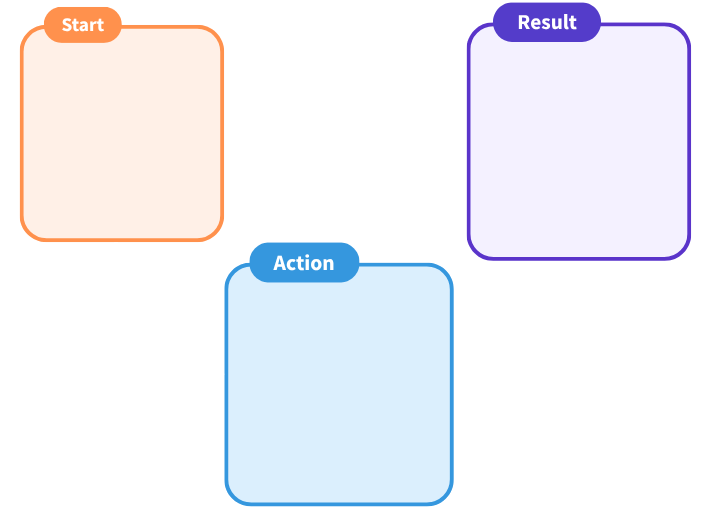
What Are IR Flows?
Short for Incident Response Flows, IR Flows are Friday’s configurable, no-code automation workflows.
They are the mechanism that turns Friday from a detection tool into an ideal IT sidekick. Every IR Flow is built around three core components — mirroring the exact tile structure you see on the Friday canvas.

Start tile
The event that starts the flow.
Triggers are the incidents Friday detects automatically — any deviation from your environment’s established baseline. The moment a trigger fires, Friday is already on it.
Example: A device goes offline. Friday detects it instantly and the IR Flow begins — no alert sent to your team, no ticket opened. Friday handles it first.
Action tile
Friday’s corrective response.
Actions are what Friday does when a trigger fires. You configure the corrective step, how long to wait before executing it, and whether approval is required before Friday acts.
Example: Power cycle the offline device. If approval is required, Friday pauses and notifies your designated approver before proceeding — always under your control.


Result tile
The verification step.
After executing an action, Friday checks whether the issue was resolved. If yes — Friday notifies your team with a full resolution summary. If no — Friday triggers the next action or escalates. Whatever you decide.
Example: Device back online — Friday sends a full resolution summary with diagnostic details. Still offline — Friday opens a support ticket automatically with everything your team needs to know.
How It Works
From Anomaly to Resolution.
Every IR Flow follows the same intelligent logic — turning unpredictable incidents into predictable outcomes.
1
Anomaly detected
Any deviation from your environment’s established baseline. Friday identifies it in real-time.
2
Automated root cause analysis
Friday diagnoses what caused the issue before taking any action.
3
IR Flow triggers
Friday executes the corrective action your team pre-configured — wait time, approval, and action type all defined by you.
4
Verification
Friday checks against the baseline to confirm the environment is back to normal.
5
If resolved ✓
Friday sends a full resolution summary — what happened, what Friday did, and when the issue was closed.
6
If not resolved ✗
Friday triggers the next action in the flow, or automatically creates a support ticket with full diagnostic data attached. Whatever you decide.
The entire process — from detection to resolution summary — happens automatically. Your team gets notified when something needed attention, what Friday did about it, and whether it worked. Not a flood of alerts. A clean outcome.
What Friday Can Automate
The Complete IR Flow Service Catalog.
18 pre-built trigger types across four categories. Every item is configurable — set wait times, approval rules, and escalation paths to match your environment.
01 — Windows Server & System Health
Windows Server Maintenance
Runs routine optimization and background cleanup to keep the OS responsive.
Windows Server Low Disk Space
Detects storage thresholds → triggers automated cleanup of temp files and logs.
Windows Server Software Patch Available
Detects pending updates → prepares the system for a safe maintenance window deployment.
Windows Server High CPU
Identifies runaway processes → attempts service restarts or alerts to prevent a total system lockup.
Windows Server Low Memory (RAM)
Detects memory exhaustion → identifies leaks and clears cache to maintain application speed.
02 — Network Continuity & Connectivity
Firewall Primary WAN Issue
Detects brownout or blackout on the main fiber line → triggers immediate backup switch.
Firewall Secondary WAN Issue
Checks backup health (LTE/Starlink) → ensures the backup is functional before it is needed.
Firewall Public IP Address Changed
Tracks WAN IP rotations → instantly updates records to prevent VPN/remote lockout.
Cloud App Reachability Degraded
Checks path health to Office 365, Zoom and other cloud apps → pinpoints if the bottleneck is internal or ISP-based.
Network Port Status Changed
Real-time detection of Layer changes → alerts if a critical link goes down or comes back up.
Known Device Type in Wrong VLAN
Detects if a device like a VoIP phone is on the wrong segment → automates port reconfiguration.
03 — Physical Layer & Hardware Integrity
Device Goes Offline
Constant heartbeat detection → initiates the recovery chain if a device stops responding.
Switch Port Cable Error Detected
Uses Auto-TDR diagnostics → finds the exact footage of a cable break in 10 seconds.
Switch Port Half Duplex
Detects collision-heavy mismatches → attempts to re-negotiate for full-speed performance.
Switch Port Link Speed Changed
Flags ports dropping from 1000Mbps to 100Mbps → catches degrading hardware before total failure.
Switch Fan Failure
Checks cooling sensors → triggers emergency alerts to prevent hardware failure from overheating.
Switch Power Supply Failure
Detects failure in redundant power units → alerts to swap the PSU before the site goes dark.
Switch PoE Capacity Reached
Checks Power over Ethernet budget → prevents cameras and phones from shutting down due to overdraw.
Business Impact
What IR Flows Actually Deliver.
Friday AI gives IT teams and MSPs back the hours they’ve been losing to Tier 1 busywork — here’s what that looks like in real numbers.
| Metric | Industry Standard | With Friday AI |
|---|---|---|
| Response Time (MTTR) | 4.8 hours | 1.6 hours — 67% faster |
| On-Site Dispatches | 1 per week average | 1 per month — 75% reduction |
| Cable Diagnostics | 2–4 hours (manual) | 10 seconds (Auto-TDR) |
| System Uptime | 98.7% | 99.96% (+1.26% gain) |
Ready to start building?
Full step-by-step instructions for building, configuring and managing IR Flows are available in the Friday AI documentation.
Integrations
Friday Fits Into How Your Team Already Works.
IR Flows don’t replace your existing communication and ticketing workflows — they enhance them. Friday uses an Open REST API to integrate with any modern ITSM platform.
Communication Channels
SMS / Text — direct high-priority alerts for critical failures
Email summaries — detailed resolution reports documenting every action Friday took
In-platform notifications — real-time updates directly in the Friday Dashboard
ITSM Platforms
ServiceNow
ConnectWise
Autotask
Zendesk
Open REST API
Integrates with any modern ITSM platform via Open REST API.
When Friday escalates an issue, the support ticket it creates isn’t a blank form — it arrives with logs, port data, ClearSight visual proof, and a complete record of every step Friday attempted. Your team starts troubleshooting with full context, not from scratch.